🤖 AI Needs Structure: Why Now Is the Perfect Time for HARBOURINO
With the rise of AI-driven workflows (Copilot Agent + VSCode), one thing becomes clear:
It’s more important than ever for developers to maintain well-structured code.
🧠 AI can only help you if it understands how your code is structured.
Harbourino is not a tool — it's a universal structure principle.
It works seamlessly with FiveWin, mod_harbour, Harbour, but also with PHP, HTML, JavaScript — even with plain text formats like Markdown, documentation, or natural language in German or English.
🛑 Harbourino does not change your source code.
It structures your code — but it doesn’t rewrite, replace, or reinterpret anything.
🧠 What this means:
- Your code stays exactly as you wrote it.
→ No magical transformation, no framework overhead. - You control the content, style, and logic.
→ Harbourino simply helps you organize it more clearly. - What you write inside a block is exactly what gets inserted into the project.
→ Full transparency for you, clarity for others (and for AI). - No custom syntax, no DSL.
→ Works with FiveWin, mod_harbour, Harbour, PHP, JavaScript, HTML, Markdown, and plain text.
🧩 Think of it like your text editor:
For your code, it makes no difference whether you use MultiEdit, FiveEdit, VSCode, Notepad, or anything else — the code is yours. The editor just helps you stay productive.
The same applies to Harbourino:
It doesn't alter your logic — it simply gives you a clear way to structure, reuse, and navigate your work.
🎯 Important Reminder:
The quality of your source code is yours — not the result of a framework.
Harbourino does not generate, optimize, or enforce your logic.
It simply lets you organize your work more clearly — across any language or style.
Whether your code is beautiful, messy, elegant, or fast:
That’s up to you — Harbourino never interferes.
Just like an editor doesn't write code for you,
Harbourino doesn't pretend to improve it.
It helps you structure what you’ve written — not define how you write.
Harbourino is more than a patcher.
Yes, it lets you compose your application from modular source blocks — but it's also a preprocessor, capable of:
- analyzing structure
- replacing variables
- activating or hiding blocks
- generating documentation
- supporting automation, internationalization, and AI integration
🧠 The Two Core Functions of Harbourino:
1. 🧩 Patcher Function (Inject Code Blocks)
Blocks like #LOGIN_CHECK or #NETWORK_STATUS are injected directly into your project.
- Promotes modularity and reusability
- Enables clean separation of logic
- Similar to
#include— but language-agnostic and semantically powerful
2. ⚙️ Preprocessor Function (Logic & Transformation)
- Remove or activate blocks like
//-- dev-only - Replace
@VERSION@with the current build number - Enable
@DEBUG_MODE@based on environment variables - Prepare output for documentation or translation
- Works like a C preprocessor or Makefile system, but is syntax-neutral
💡 A Hidden Game-Changer: VSCode + Harbourino
One of the most underrated advantages of Harbourino is how perfectly it fits into the VSCode environment:
✅ Why VSCode is ideal for Harbourino:
1. Each block = its own file = correct syntax highlighting
DETECT_NETWORK_ACCESS.php → full PHP highlighting
UI_DIALOG.prg           → Harbour/FiveWin syntax
DRAW_CHART.js           → JavaScript IntelliSense
DOC_INTRO.md            → Markdown live preview
LICENSE_block.txt       → clean, readable plain text
🔁 Every block feels like a real module, even though it's part of a bigger system.
No artificial bundling — just clean, context-aware editing.
2. Quick navigation & file awareness
- Jump to any block with
Ctrl+P - Hover tooltips, minimap, breadcrumbs — all work naturally
- Clean structure in the file explorer
3. Versioning per block
- Git diff shows which block changed
- Easy to blame, revert, extract or refactor
- Works great for
changelogs,RAG training,Copilot context injection
4. Block structure makes VSCode breathe
Instead of massive.prgor.phpfiles, you have
cleanly separated files with proper syntax, comments, and metadata.
🔄 Why Harbourino is especially valuable now:
- GitHub Copilot and similar AI agents analyze block structure more effectively
- Tools like Ollama + RAG can search block names directly
- Prompt injection, refactoring, and live replacement become predictable
- Local AI indexing (e.g.
grep,ctags,json) becomes practical
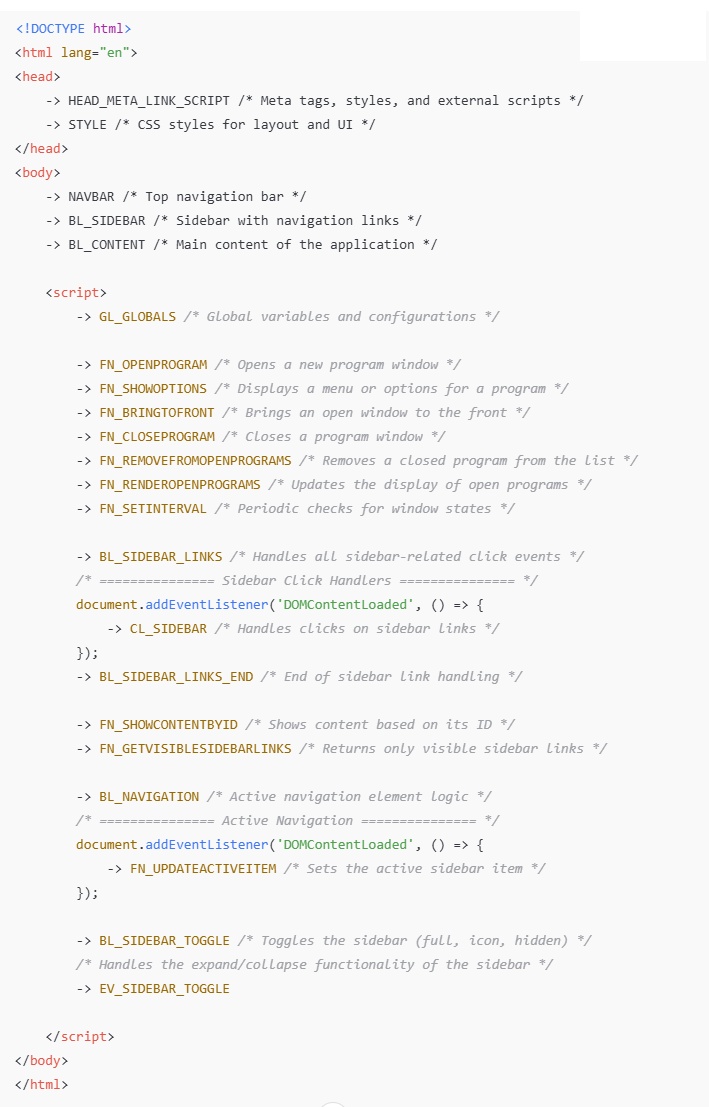
🧘♂️ Clean, Minimal Main Code — Logic Outsourced
Keep the main code clean.
Just like in Clipper or FiveWin, where MAIN.PRG was readable, minimal, and elegant —
Harbourino lets you organize all complexity elsewhere, while keeping the core easy to follow.
💡 What it actually enables:
- Your main file becomes narrative — reads like a story
- Onboarding new developers becomes simple — they see only the essentials
- Complexity is modularized but always accessible
- Code becomes readable, maintainable, portable
✨ Harbourino preserves the lightness we value in Clipper and FiveWin —
Even in a world of AI-generated functions, modules, and layouts,
your main application remains clean, focused, and fully in your control.
Thanks to Harbourino, the center of your project stays simple and elegant — even if AI generates new components around it.
Even with AI-generated code blocks:
Your main program stays structured, concise, and readable.
📂 Resources & Examples
- 📘 General Description (PDF)
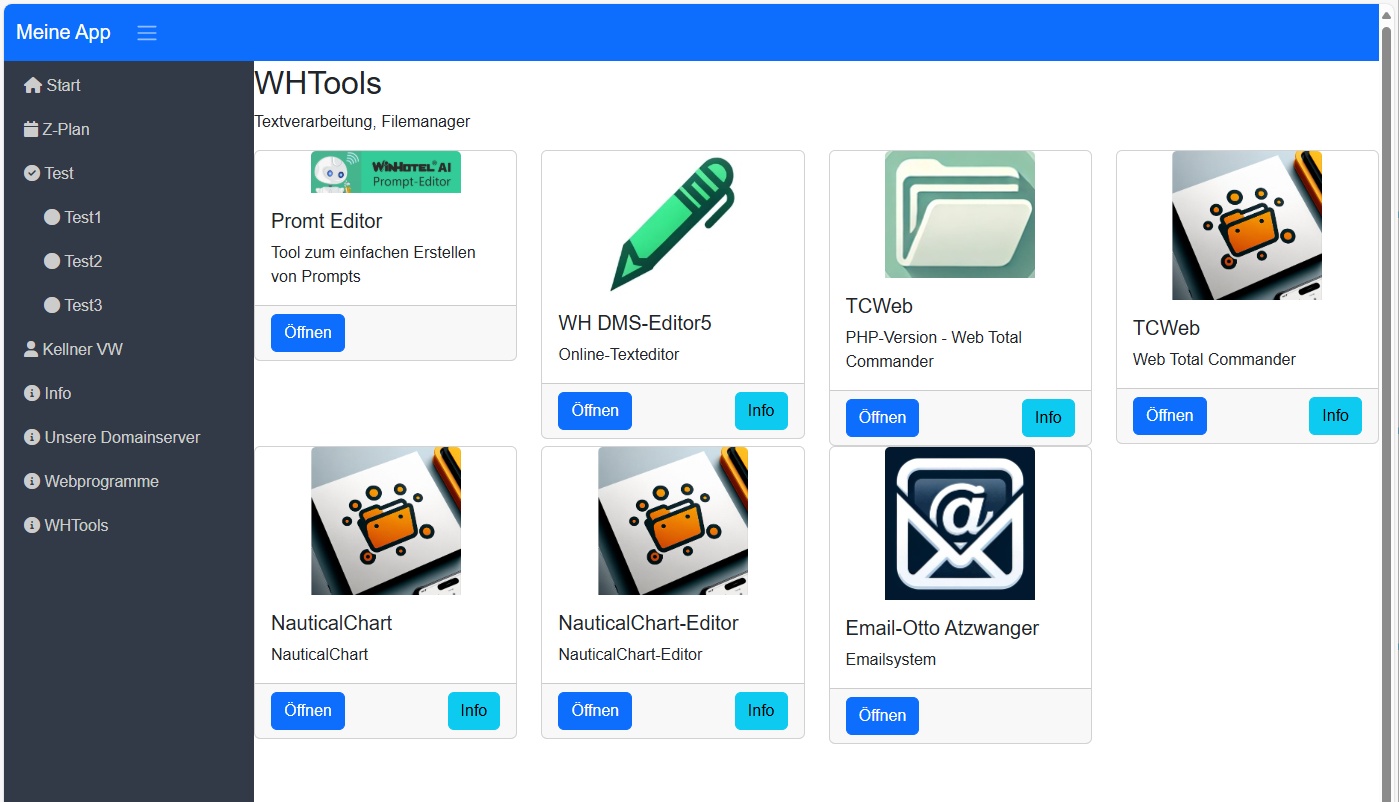
- 🖥️ Program Screenshot:
This is an example of a program with a complex underlying source code — elegantly structured using the Harbourino style.
- 🧑💻 Main Source Code Screenshot:
- 📝 Program Description (Flexible Template, PDF)
- 📄 Schema & Abbreviations (PDF)